
OpenAI introduced ChatGPT Translate; basically, it is a standalone AI-powered translation service tool. This tool brings generative translation capabilities to a dedicated web interface and directly challenges established players like Google Translate.
What impresses the most about this tool is that it supports over 50 languages and offers unique AI-powered customization options, such as adjusting tone and simplifying text for specific audiences.
Let’s learn more about the tool.
What is ChatGPT Translate?
In simple words, ChatGPT Translate is a web-based translation platform available at chatgpt.com/translate. Developed by OpenAI, the tool functions independently from the main ChatGPT interface and is designed specifically for fast, accurate text translation.
Unlike conventional translation services, ChatGPT Translate focuses on contextual accuracy rather than literal language conversion. The tool uses generative AI models to interpret meaning, tone, and structure before delivering translations, making the output sound more natural and human-like.
The feature was launched quietly without a formal announcement, yet it has already gained attention for its potential to challenge existing leaders in the translation space.
Key Highlights of ChatGPT Translate
What sets ChatGPT Translate apart is its integration of generative AI for post-translation refinements. Not only this, but it also offers multiple features like tone adjustment, context-aware translation, simplified language output for different audiences, real-time translation support, and a lot more. Let’s discuss some of the major ones here.

1. AI-Driven Translation with Context & Nuance
Rather than simply swapping words between languages, ChatGPT Translate focuses on meaning, context, and tone, making translations feel more natural and fluent.
2. Supports 50+ Languages
The tool currently offers translation across more than 50 languages, making it useful for global communication and multilingual content needs.
3. Customizable Tone Options
Users can refine translations by choosing different styles, such as formal, casual, academic, or simplified, giving them more control over how messages are conveyed.
4. Clean, Familiar Interface
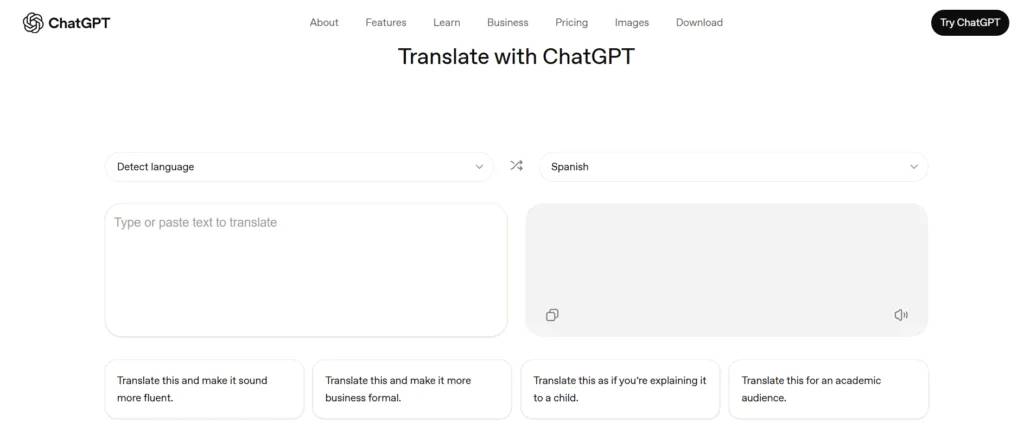
ChatGPT Translate uses a dual-panel layout with source and target text boxes, making it instantly recognizable and easy to use for anyone familiar with online translation tools.
5. Standalone Web Tool
The translation feature lives on a dedicated webpage, separate from the main ChatGPT app or platform, allowing users to access it directly in a browser.
6. Currently Text-Only with Growing Potential
At launch, the focus remains on text translation, with voice, image, and advanced features still developing, giving users a glimpse of future enhancements.
How to Use ChatGPT Translate (Step-by-Step)
Let us walk you through accessing the tool, entering your text, selecting languages, and refining translations so you can achieve accurate, context-aware results with ease and efficiency.

1. Access the Tool
Open your web browser and visit chatgpt.com/translate to access the dedicated ChatGPT Translate interface. No login or account is required, making it easy for anyone to start translating instantly.
2. Enter Your Text
Type or paste the content you wish to translate into the input box. Whether it’s a short sentence, paragraph, or longer text, the tool can handle it with real-time responsiveness.
3. Select the Source Language
Choose the original language manually from the dropdown menu, or enable automatic detection for convenience. The AI detects the language of your text and prepares it for accurate translation.
4. Choose the Target Language
Pick the language you want the text translated into from the available list. ChatGPT Translate currently supports over 50 global languages, covering a wide range of communication needs.
5. View Instant Translation
As soon as the text is entered and languages are selected, the translated content appears in the output panel. This real-time translation allows you to review or share results immediately.
6. Refine the Translation (Optional)
Users can further refine the output by adjusting tone, complexity, or style. Whether you need a professional, casual, or simplified version, the AI ensures your translation fits the intended audience.
Comparison with Existing Tools
Let’s compare the existing Google Translate tool and the new ChatGPT Translate based on their features and capabilities:

| Feature/Capability | ChatGPT Translate | Google Translate |
| Language Support | Supports over 50 languages, focusing on major global languages. | Offers translations in over 200+ languages, covering rare and regional languages. |
| Interface | Web‑based dual text boxes with automatic language detection. | Web and mobile app interface with text, voice, and image input options. |
| Tone & Style Customization | Yes, it provides presets like formal, child‑friendly, and academic. | Limited tone and style customization compared to generative AI tools. |
| Context & Meaning Focus | Emphasizes contextual, generative AI translation for natural phrasing. | Strong literal translation with improving AI nuance via Gemini, but limited style control. |
| Multimodal Input | Currently, text input is on desktop, and voice is via mobile browser. | Supports text, image, voice, website, and document translation. |
| Offline Support/Apps | Web-only; no dedicated mobile app or offline mode yet. | Available as mobile apps on Android/iOS with offline translation support. |
| Real‑Time Conversational Support | Not yet available; primarily text input. | Offers real‑time speech‑to‑speech translation and conversational modes. |
| Additional Tools/Ecosystem | Still developing; integration into main ChatGPT workflows is possible. | Mature ecosystem with integration into search, apps, and AI features. |
ScalaCode Perspective
At ScalaCode, we view the launch of ChatGPT Translate as a significant milestone in AI-driven communication. Tools like this demonstrate how generative AI is transforming the way businesses approach multilingual communication, localization, and content delivery.
As a leading AI Chatbot development company, we help organizations integrate intelligent translation and language solutions into their digital products. Our provided solutions enable faster global reach, improved user engagement, and more context-aware interactions across platforms.