
Design is not just what it looks like and feels like. Design is how it works., Steve Jobs
Looking ahead to 2025, UI/UX design will change radically. That’s the reality, not just the piece of line.
Users will be interacting more quickly through digital channels; that means a digital product owner has to stay updated, actually ahead of user expectations.
A recent report indicates that the global UX services market, valued at $2.59 billion in 2022, is projected to skyrocket from $3.50 billion in 2023 to a staggering $32.95 billion by 2030.
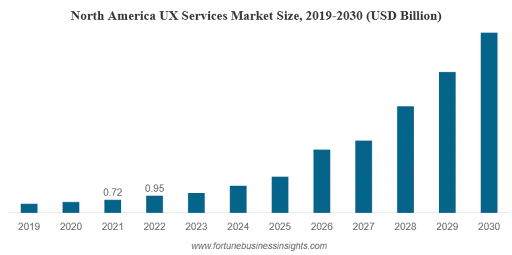
This is a remarkable compound annual growth rate (CAGR) of 37.8% during this period. That’s great.
New emerging UX/UI design trends will ensure methods to enhance User Experience quality by enabling more interaction with user devices. Be it startups or enterprise-level organizations, this is the post one can relate to if they simply wish to see what goes on within this field of expertise.
This blog will take one through some of the top UI/UX design trends to watch out.
From advanced cursor interactions to the most loved dark mode option to the metaverse, it’s all in the mix to enhance user engagement in one way or another and make interactions more intuitive.
Let’s jump directly and see those trends.
15+ Top UI/UX Design Trends
A study by Forrester found that every dollar invested in UX brings $100 in return, that’s a staggering 9900% ROI.
So, as user experience continues to be a critical factor in the success of any digital product or service, it’s vital to know the latest UI/UX design trends. Therefore, we will be covering some of the trendiest ones, how these trends affect user experiences, and the best ways to implement them. Get ready to explore the trends that will shape the future of UI/UX design!
UI/UX Design Trend 1: Advanced Cursor Interactions

The interesting thing about UI/UX design trends in 2025 is going to be advanced cursor interaction. It seems pretty insignificant when thinking that something as simple as changing the form and size of the cursor may matter.
Well, designers made cursors dance by adding animation to them to create fun in interaction. Other new things that can be done using cursors include hovering over it to pop up menus or replay animations.
And that’s another goal for intuitive navigation, which should make the user enjoy themselves more when spending time with the product. Thus, hire UI/UX Designers to create a product that is not only functional but also delightful to use.
Key Pointers
- Altering cursor shapes and sizes for greater engagement.
- Introduction of animation in interactions for its liveliness.
- The use of cursors to initiate actions ensures smooth navigation.
UI/UX Design Trend 2: AI-Integrated Design
AI is fast becoming a very helpful assistant in the design process, right from brainstorming to prototyping.
The best part is leveraging AI in UX design; it is easy to create more personalized experiences for users by analyzing user behavior and preferences.
AI tools, based on data, can also suggest design elements, layouts, and even color schemes. As AI technology continues to improve, so does its role in UI/UX design in making the design process more efficient and effective.
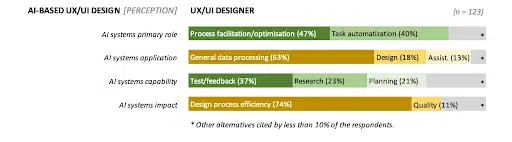
Further, as per Hubspot, most web designers are using AI: 93% have used AI tools to help them with their web design work in the past three months.
Key Pointers
- AI-powered assistance in design phases, from ideation to prototyping.
- Personalization of experiences by the analysis of users’ data made by AI.
- AI-powered design element and layout suggestions.
UI/UX Design Trend 3: Personalized Experiences
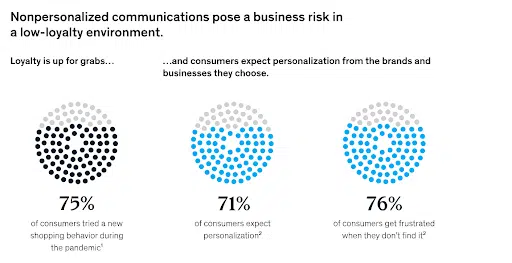
Research shows that 71 percent of consumers expect companies to deliver personalized interactions.
With this, it means that the generation of more particular experiences will occupy a highly peninsular position among UX UI trends. There is an ever-growing trend where the target consumers demand that digital products address their unique requirements. Moreover, using aggregated user data, businesses can make recommendations and publish content that will be interesting to each user.
Personalization experience, comprehensive means the user feels a sense of ownership and hence the products in question will be easier to sell.
For instance, an app might recommend content through its understanding of users previous engagement, which makes it easier to find information around the application. That is why for further improvements and increasing the level of customers’ satisfaction personalized offers can be effectively used in businesses.
Therefore, the ability to offer tailored services to the consumers shall be one of the latest trends in the UX segment, that will not only make products more efficient but also closer to individuals.
Key Pointers
- Personalized approach to adaptation and compliance to the personal requirements of users.
- Increasing the chances of the right target group receiving relevant suggestions based on the data gained.
- The two are by improving the satisfaction levels of user and by building customer loyalty.
UI/UX Design Trend 4: Cross-Platform UX
Users nowadays interact with digital content on multiple devices, starting from desktops to mobiles and tablets. Therefore, it has become necessary to provide flawless experiences across all platforms.
Cross-platform UX focuses on creating consistent and smooth experiences irrespective of the device. Therefore, avail such Frontend Development Services that aims on user interface elements that adapt fluidly to different screen sizes and orientations, further enhancing user satisfaction and engagement. Flowing these trends in UI UX design lets you enjoy benefits like wider reach, cost-efficiency, etc.

Key Pointers
- Fluidly consistent interfaces for various screen sizes.
- Focus on personalization across platforms.
UI/UX Design Trend 5: Location-Based UX
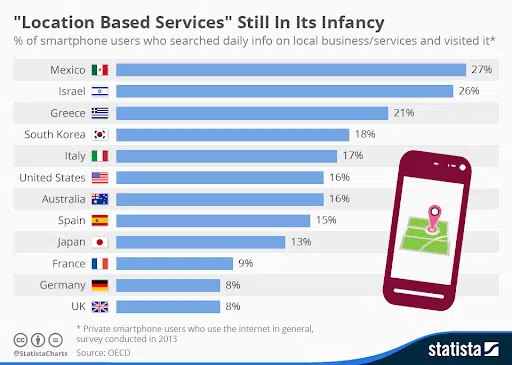
Statistics show that location-based services are widely used across countries, thus emphasizing the crucial role of location-based UX as a key differentiator for businesses. No wonder it is one of the top UI/UX design trends that businesses are actively incorporating into their applications.
It’s being increasingly used in personalization and contextualization with the help of location data. UX based on locations helps in location-based customization for content, notifications, and other services, depending on the geographical boundaries of the users.
This becomes particularly useful for applications linked to location-based services, including weather updates, taxi-hailing services, food delivery, and events, so it ensures that all information is correct and timely.
Key Pointers
- Personalized experiences using location data.
- Context-aware notifications and services.
- Enhanced relevance for localized services.
UI/UX Design Trend 6: Animated Icons
Animated icons are among the hallmarks of modern UI design trends. They confer motion to interfaces and make them more interesting and engaging. With animated icons, users get guidance through certain tasks and receive feedback from their interactions.
A spinning loading icon, for instance, shows users that something is going on backstage, which reduces uncertainty and improves the overall user experience.
Further, while implementing the latest UI/UX design trends for your digital product, be it web or mobile, ensure that the animations are subtle and don’t distract the user from the core functionality. Overly complex or flashy animations can be jarring and hinder usability.
Key Pointers
- Introduce motion into icons to make them visually interesting.
- Guide users through tasks using animated icons.
- Providing feedback upon user interactions.
UI/UX Design Trend 7: 3D Visuals
3D graphics and animations are increasingly being used to develop more realistic and engaging user interfaces. 3D adds depth and realism, enhancing the visual experience.
These elements show an increasing usage in product displays, virtual tours, and interactive storytelling that engages users in a dynamic experience. While availing of custom software development services, consider incorporating these elements to enhance user engagement and create a more immersive and memorable experience.
Key Pointers
- Immersive interfaces with the help of 3D graphics and animations.
- More realistic displays of products and virtual tours.
- 3D storytelling is about creating dynamic user experiences.
UI/UX Design Trend 8: Emotionally Intelligent Design
Designing interfaces with the consideration of and response to users’ emotions is an approach towards a bright future. Emotionally intelligent design would adapt to mood and preferences to make the user experience even more personalized.
As an example, frustration detected in a user would be met by a digital assistant offering them calming suggestions, or perhaps soften its tone to improve customer satisfaction.
Key Pointers
- Interfaces that respond to the emotions of users.
- Adaptation to users’ moods for personalized experiences.
- Enhanced satisfaction through emotionally aware design.
Explore More: Software Development Companies in India
UI/UX Design Trend 9: Emphasis on Typography
With each passing day, bold and impactful typography is finding its place in UI/UX design. But typography does not only catch user attention; it actually conveys the personality of a brand.
Designers experiment with typefaces, size, and placement to make visually appealing interfaces. Crystal-clear and readable typography ensures a better user experience by making information accessible.
Key Pointers
- Bold typography for capturing the attention of users.
- Communicating brand personality through typography.
- Improved readability and accessibility.
UI/UX Design Trend 10: Data Visualization
The new trends in UX design put an emphasis on data visualization. Challenging data information requires qualitative methods that offer beautiful and descriptive interfaces through which users grasp the info given easily.
Graphs, charts, and infographics are examples of visual tools that are used by designers who actually make data into stories that are useful for decision-making.
| Data Visualization Type | Purpose |
| Line Charts | Show trends and patterns over time |
| Bar Charts | Compare categorical data statistically |
| Pie Charts | Show part-to-whole ratios |
| Scatter Plots | Illustrate the relationship between two variables |
| Heatmaps | Visualize data distribution or density in a given area (e.g., on a map) |
| Infographics | Tell a story or create a narrative with data using various visual elements |
Data visualization enhances user experience, thereby increasing the simplicity of large data. For instance, a dashboard that has illustrated sales data is useful in enabling the sort of decisions businesses need to be making without having to exert much effort in doing so.
By 2025, data visualization will assume importance in many industries and will help to increase audiences’ involvement and understanding in digital environments.
Key Pointers
- Formulate glamorous data depiction.
- Graphic display is a means of conveying a large amount of data.
- Users’ comprehension and ability to make the right decisions in their judgments.
UI/UX Design Trend 11: Dark Mode
UX design direction for another three years appears to persist in the usage of the dark mode. This feature is actually related to the use of black themes in the interfaces that minimize eye strain while maximizing legibility.
The benefits of dark mode extend beyond aesthetics. It can also save battery life on devices with OLED screens. By providing a comfortable viewing experience, dark mode enhances user satisfaction.
This trend demonstrates the importance of considering user comfort and accessibility in UI/UX design.
Key Pointers
- It lessens the strain on the eyes, making prolonged screen time more comfortable.
- The darker color scheme can often provide a more focused and immersive experience, reducing distractions and improving readability.
- It conveys a sense of elegance and professionalism, aligning with contemporary design trends.
UI/UX Design Trend 12: Micro-interactions
Micro-interactions are small visual and interactive elements that significantly enhance the user experience. These include animations, hover effects, and subtle feedback that guide users and provide a more immersive experience.
In 2025, micro-interactions will become more intricate, focusing on making interfaces intuitive and responsive. This trend is about making interactions smooth and enjoyable, keeping users engaged and informed.
Key Pointers
- Utilizing small, engaging visual elements.
- Enhancing interactions with animations and feedback.
- Creating an intuitive and responsive user experience.
UI/UX Design Trend 13: Clean User Interfaces
Minimalism continues to influence trending UI UX design but with a twist. While clean interfaces remain popular for their simplicity, adding subtle visual elements creates interest and engagement. Designers can incorporate textures, gradients, or unexpected animations to keep interfaces fresh and captivating.
This approach balances functionality with aesthetics. A clean design ensures easy navigation, while unique elements add character and memorability. As users seek both clarity and creativity, this trend highlights the importance of delivering straightforward yet engaging user experiences.
Key Pointers
- Keeping interfaces minimal yet engaging.
- Adding subtle visual elements for interest.
- Balancing functionality with aesthetics.
UI/UX Design Trend 14: The Metaverse
Did you know? Gaming and Software Giants are heavily investing in the metaverse.
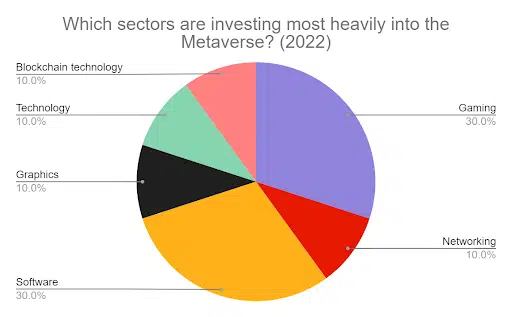
The metaverse is redefining how we think about user interfaces. Designing for immersive virtual experiences is becoming a critical part of UI/UX design.
With the rise of virtual and augmented reality applications, interfaces need to be intuitive and engaging. In 2025, the metaverse will be a significant aspect of design, focusing on creating seamless interactions in virtual spaces.
Key Pointers
- Crafting interfaces for virtual and augmented reality.
- Enhancing immersive virtual experiences.
- Ensuring intuitive interactions in the metaverse.
UI/UX Design Trend 15: Responsive Design
Responsive design remains essential as users access digital platforms from various devices. Designing interfaces that adapt seamlessly to different screen sizes and devices is crucial. In 2025, responsive design will continue to evolve, ensuring that users have a consistent experience regardless of the device they use. This trend is about maintaining usability and accessibility across all platforms.
Key Pointers
- Ensuring interfaces adapt to different screen sizes.
- Maintaining a consistent user experience across devices.
- Focusing on usability and accessibility.
UI/UX Design Trend 16: Proactive UX (PX)
Preventive UX, or PX, means that the user interface is designed based on predictions of user requirements instead of just following user demands. In this manner, through the use of AI and machine learning, PX designs can proactively detect problematic shifts in the user engagement journey and balance them before they create an issue.
Adoption of AI in UX design approach takes the user experience journey and demonstrates that the platform appropriately comprehends the needs of the users. The main advantage in this case is getting a more natural and smoother user experience.
For SaaS startups, mainstreaming of PX brings out a distinct competitive advantage, making your application the best among the SaaS products offered in the market.
Key Pointers
- Predictive capabilities because of using AI/ML, easy to anticipate user needs and identify potential problems.
- Proactive solutions to address issues before they impact the user experience.
- Resulting in a smoother, more natural, and improved user journey.
UI/UX Design Trend 17: Biometric Authentication
By 2025, deep authentication based on biometrics will be common for another problem that people experience: the fatigue of passwords. This method involves logging in through facial, fingerprints, or voice, such as: This method involves using facial features, fingerprints, or voice, and is very convenient in implementing the login process.
With customers looking for ways to engage the digital interfaces with ease, biometric authentication stands out as a popular ux design. It improves security at the same time minimizes the number of obstacles, which is why it is perfect for systems that require high levels of security, like banking and e-commerce systems.
Implementation of Biometric authentication for SaaS product development can also give a company an added edge by focusing on user satisfaction and security.
Key Pointers
- Integrate seamlessly into the user flow.
- Prioritize security and user privacy.
- Ensure accessibility for all users.
Wrap Up
These were 15+ UI/UX design trends that are presently taking the digital world by storm. As technology continues to evolve, so too must the way we interact with it.
As Dain Miller, a renowned user experience expert, once said, “UI is the saddle, the stirrups, & the reins. UX is the feeling you get being able to ride the horse.”
These trends reflect this philosophy, prioritizing user-centric design that is not only aesthetically pleasing but also intuitive, efficient, and accessible. To include these UI UX trends into your digital products, hire designers from ScalaCode to get the best UI and UX Design Services.
Our team can create truly exceptional user experiences that are both engaging and meaningful.
FAQs
Q1. In UX design, what is the next big thing that is likely to emerge?
The next big thing for UX design in 2025 is AI design. AI helps designers in ideation, modeling, and designing client experiences based on their behavior patterns; enhances the efficiency and creativity of the design processes.
Q2. What is the significance of AI in UI/UX design?
AI plays a crucial role by assisting in brainstorming, suggesting design elements, and creating personalized user experiences based on data analysis. Its efficiency enhances the overall design process.
Q3. How do animated icons improve user experience?
Animated icons guide users, provide feedback, and add visual appeal, making interactions more engaging and informative, thereby enhancing the overall user experience.
4. What are the rules of good UI design?
Design principles that define good UI design are brochured intending to improve the functional experience of the clients. Here are ten rules to consider:
● Visibility of System Status: This means giving feedback to the users promptly regarding what is going on within the system.
● Match Between the System and the Real World: Reference things familiar to the users; in other words, the overall layout of the interface should be easy to understand.
● User Control and Freedom: Make it possible, as much as possible to enable users to be in charge of their experience through the product through multiple course corrections.
● Consistency and Standards: Where possible one should stick to one look and feel with regards to the design aspects or the functions involved in order to minimize confusion to users.
● Error Prevention: Explain interfaces in such a way that the chance of errors being made is reduced, and give clear prompt and warning messages.
● Recognition Rather Than Recall: The first design heuristic was to make information readily identifiable by users so that they do not require lots of effort to locate features in the interface.
● Flexibility and Efficiency of Use: For beginners, provide walking directions and simple routing options, while expert and experienced users should enjoy special routing options.
● Aesthetic and Minimalist Design: No unnecessary features; concentrate on clear and purposeful forms that enable tasks of the user.
● Help Users Recognize, Diagnose, and Recover from Errors: This should be accompanied by readable and practical outcome advice to help users get past problems experienced.
● Help and Documentation: However, you don’t have to though remember to include an easily accessible help and documentation area for users who require help.
Through following those principles and guidelines, one can bring great aesthetic and sleek UI/ UX designs that are even easier to operate.
Q5. What are the 7 factors of UX design?
The seven factors of UX design encompass essential elements that contribute to an effective user experience:
1. Usability: Making certain that the wide usage of the product is attainable and comprehensible.
2. Desirability: Engagement strategy to develop an emotional bond with the users of the site.
3. Accessibility: Web design for the disabled and the disadvantaged.
4. Value: Providing users with a product that meets their needs and adds value to their lives.
5. Credibility: Building trust through transparent practices and reliable information.
6. Findability: Ensuring that users can easily locate information and features within the product.
7. Interface: The quality and aesthetics of the product interface that facilitate interaction.
Q6. How to implement UI/UX design?
Adhering to the best practices of user interface/ user experience design is crucial in this competitive digital world. Here are essential steps to follow:
1. Research and Analysis: Start with your target audience, since this involves knowing what they like and what they possibly consider an inconvenience. Collection of data by using surveys, interviews, and analytics tools.
2. Define User Personas: Develop Audiences Here, which is a persona or avatar that reflects the given audience. This will ensure that the design of the artefacts will be informed by the needs of the end users.
3. User Journey Mapping: It is important to create a map of the user and analyse it, in order to understand all the stages that a user goes through while using a certain product. This, in turn, enables understanding of their experience and the areas of intervention.
4. Wireframing and Prototyping: Create mockups that will define the placements on your interface. It is recommended that some level of interaction be planned and faked during prototyping in order to gain feedback early on in the design process.
5. Visual Design: Concentrate on appearance by first using proper color combinations, fonts, and images that are relevant to your business and the visions of the intended users.
6. Usability Testing: Real users should go through the prototype and report the problems they experience, and report back. User observation will be insightful because you will be observing people as they engage with the design.
7. Iteration and Improvement: Try to improve your design on the basis of the feedback that you have received during the testing phase. Repetition plays a role in improving interaction and guarantees an optimal experience for the client.
8. Implementation: Organise and work with developers to put into effect the design. Make sure the design you have on paper is actually followed through in the end product.