


The rapid growth of mobile-first digital experiences has made mobile applications a critical part of every business. A high-performing and reliable mobile application not only enhances the overall customer experience but also strengthens brand credibility, improves user engagement, and supports long-term business growth.
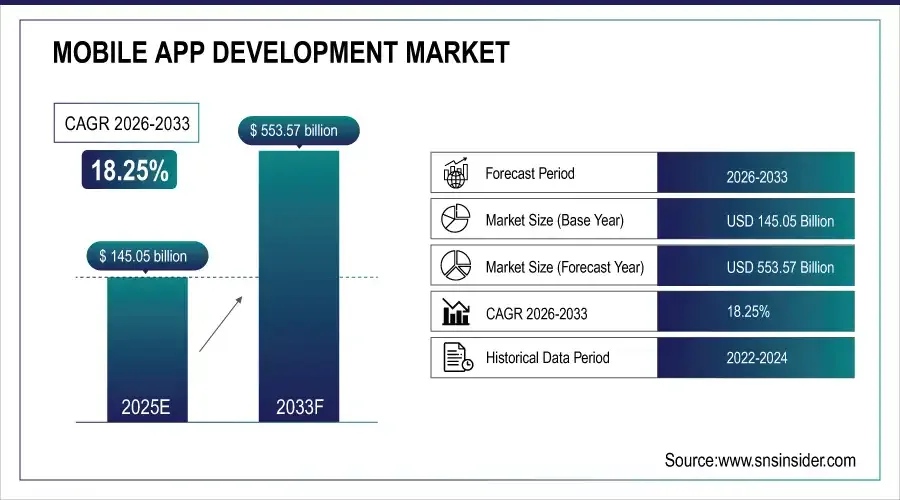
The Mobile App Development Market Size was valued at USD 145.05 Billion in 2025 and is expected to reach USD 553.57 Billion by 2033 and grow at a CAGR of 18.25% over the forecast period 2026-2033. In addition to that, the Native Mobile Apps led the market with a share of 52.30%. (Report)
Hence, it is important for businesses to build an app that delivers optimal performance, robust security, and a seamless user experience across devices. This is where native mobile app development comes into play. Native-based mobile applications are designed specifically for individual platforms, enabling faster performance and deeper device integration.
Native mobile applications have multiple business advantages; hence, they remain the ideal choice for organizations building business-critical mobile solutions. In this guide, we will discuss all the notable points regarding native mobile application development, like benefits, development process, cost factors, etc.
What Is Native Mobile App Development?
Let us understand what native mobile apps are in simple words: it is a process of creating mobile applications specifically for a single operating system. For example, Android or iOS, using the programming languages, tools, and software development kits officially supported by that platform.
Along with that, native mobile applications are built to run directly on the device’s operating system to allow seamless interaction with hardware components and system-level features. Moreover, native apps are designed according to platform-specific standards and guidelines; they deliver superior performance, faster load times, and smoother user interactions compared to other applications.
How Native Mobile Apps Work
Now, let’s understand how native mobile applications work in real time. As discussed, these kinds of applications are built specifically for a single operating system using the platform’s native programming languages and tools. This allows it to communicate directly with the operating system, efficiently utilize device hardware, and deliver smooth, responsive interactions.
In addition to that, native applications function with platform-specific code, direct hardware access, and an integrated user experience. Moreover, the internal architecture of a native app is typically organized into layers like the presentation layer, the business logic layer, and the data layer. These layers help it to work together to ensure smooth performance, scalability, and maintainability.
Business Benefits of Native Mobile App Development
Learning business benefits before launching any new application in your business is a must. It helps you in making informed decisions, evaluating ROI, and aligning the app with your business goals. So, in this section, let’s understand the business benefits of native mobile apps.

1. High Performance and Speed
Native mobile app development provides high performance and speed on a single platform (Android or iOS). As a result, this platform-specific approach eliminates unnecessary abstraction layers and offers faster load times, smoother animations, and highly responsive user interactions.
2. Superior Platform-Specific User Experience
Native apps are built in a way to strictly follow Android and iOS design standards, user interface patterns, and interaction guidelines. Hence, these applications ensure intuitive design, consistent navigation, and smooth interactions that feel natural to end users.
3. Full Access to Device Features
Through a native mobile application, you can seamlessly access all device capabilities, such as the camera, GPS, biometrics, sensors, push notifications, offline storage, Bluetooth, and system-level APIs. As a result, it enables businesses to build feature-rich applications that support advanced functionalities in real time.
4. Enterprise-Level Security
Native apps include platform-level encryption, secure data storage mechanisms, and OS-supported authentication methods to protect business data. In addition to that, Native development also allows better compliance with industry regulations and data protection standards.
5. Scalable and Reliable Architecture
You can hire mobile app developers to build native mobile applications on stable and scalable architectures that will help you support long-term growth. Moreover, native apps can handle higher workloads without compromising performance in case of an increase in user demand.
6. Faster Adoption of New OS Features
Most of the applications don’t allow faster adoption; however, native apps can quickly adopt new features, APIs, and enhancements introduced by Android and iOS updates. These faster adoption capabilities help businesses to leverage the latest platform innovations, such as improved security controls, performance optimizations, and new UI components.
Native Mobile App Development Platforms
Now, in this section, let’s understand the techniques, tools, and frameworks used by native app development platforms for both Android and iOS.
Android Native App Development
Android is an open-source, Linux-based operating system developed by Google that supports a wide range of devices, screen sizes, and hardware configurations. And all these facilities make it highly flexible for native mobile app development. To get all the benefits of an Android-based native application, you can hire Android developers.
Programming Languages: Kotlin vs Java
- Java: Traditional Android language with strong stability and community support.
- Kotlin: Google’s preferred language for Android development.
- Kotlin offers cleaner syntax, better safety, and faster development cycles.
Android SDKs, APIs, and Tools
- Android SDK provides essential libraries and APIs for native development.
- Android Studio is the official IDE for building Android native apps.
- Built-in tools support debugging, testing, performance optimization, and deployment.
iOS Native App Development
The iOS ecosystem is a closed and highly controlled environment developed by Apple. Its tightly regulated ecosystem ensures consistent performance, strong security standards, and a uniform user experience across all Apple devices. To achieve the result-driven advantages of an iOS-based native application, you should hire iOS app developers to build the app.
Programming Languages: Swift vs Objective-C
- Objective-C: Legacy language used in older iOS applications.
- Swift: Apple’s modern, high-performance programming language.
- Swift is faster, safer, and easier to maintain for native app development.
iOS SDK, APIs, and Tools
- iOS SDK provides access to native APIs and system frameworks.
- Xcode is the official IDE for iOS native app development.
- Enables deep integration with Apple features like Face ID, Touch ID, and ARKit.
Step-by-Step Native Mobile App Development Process
Building a native app requires a structured and systematic approach to ensure high performance, security, and user satisfaction. You can also take the help of an Android or iPhone app development company to build a goal-oriented solution. Additionally, you should also know the native mobile app development process to evaluate whether the application aligns with your business goals or not.

1. Requirement analysis & planning
The first step is requirement analysis and planning, where organizations need to understand the business requirements, user needs, and project scope. These activities help in setting clear objectives, identifying technical feasibility, and outlining timelines and resources.
2. UI/UX design for Android & iOS
The next step includes designing an intuitive architecture for an Android or iOS system. Here in this step, developers need to create platform-specific user interfaces that should be engaging and consistent with Android and iOS guidelines.
3. Native app development
In the next step, developers will write platform-specific code using Kotlin or Java for Android and Swift or Objective-C for iOS. Further, they will integrate APIs, device features, and backend services while following clean architecture practices.
4. Testing & quality assurance
The next step is to test the application to check whether it is functioning as expected or not. Testing the application before launching it helps QA testers to find any bugs at an early stage. Along with that, this stage also ensures that the app delivers consistent performance across devices.
5. App store deployment
After testing the application in all environments, the app needs to be submitted to Google Play and the Apple App Store, following their respective guidelines. In this step, you also need to prepare app metadata, screenshots, and compliance documentation.
6. Post-launch support & maintenance
The development process does not end at launching the app in the real world, but it also includes an after-step, which is post-launch support and maintenance. This step is important to conduct, as here you can monitor performance, fix bugs, update features, and maintain compatibility with new OS versions.
Native vs Cross-Platform vs Hybrid App Development
Choosing the right mobile app development approach is a critical decision for all kinds of businesses. This is because it directly impacts application performance, user experience, development cost, and long-term scalability. Hence, we have created the comparison table for native vs. cross-platform development vs. hybrid app development. This table may help you make an informed decision:
| Factor | Native App Development | Cross-Platform App Development | Hybrid App Development |
| Development Approach | Built separately for Android and iOS using platform-specific languages | Single codebase shared across platforms using a common framework | Web-based app wrapped in a native container |
| Performance | Excellent, highest performance, and responsiveness | Good, but slightly lower than native | Moderate to low, depends on web rendering |
| User Experience | Fully platform-optimized and consistent with OS guidelines | Near-native experience with some limitations | Limited, often less intuitive |
| Access to Device Features | Full access to all device APIs and hardware features | Partial access via plugins or bridges | Limited access to native features |
| Scalability | Highly scalable for long-term growth | Scalable, but complex apps may face limitations | Less scalable for complex or enterprise apps |
| Security | Strong platform-level security and encryption | Good security, depends on the framework and plugins | Generally weaker if not properly secured, due to reliance on web layers. |
| Development Cost | Higher initial cost due to separate codebases | Lower than native due to shared code | Lowest initial cost |
| Development Time | Longer development timeline | Faster than native | Fastest for simple applications |
| Maintenance | Easier long-term optimization and stability | Moderate maintenance effort | Higher maintenance due to web dependencies |
| Best Use Cases | Enterprise, fintech, healthcare, performance-critical apps | Startups, MVPs, budget-sensitive projects | Content-driven or simple apps |
| Long-Term ROI | High ROI for business-critical applications | Moderate ROI | Lower ROI for complex apps |
Industry-Wise Use Cases of Native Mobile App Development
Now, let’s understand the industry-wide use cases of native mobile app development. Here’s a look at how native applications help in delivering tailored solutions across industries that meet specific business and user needs.

1. E-commerce apps
Native mobile applications in the eCommerce industry provide smooth navigation, faster checkout, and seamless integration with payment gateways. By leveraging technologies like real-time inventory management, AI-based product recommendations, and push notifications.
2. Banking & fintech apps
Native mobile applications in the banking and fintech industry deliver high security, reliable transactions, and real-time financial data updates. Not only this, but it also supports biometric authentication, encryption, and compliance with regulatory standards.
3. Healthcare and fitness apps
Native-based healthcare and fitness apps ensure accurate data collection, fast performance, and a consistent experience across different devices. With the help of integrated technologies like wearable device synchronization, real-time health monitoring, AI-driven analytics, and secure cloud storage.
4. Gaming applications
Gaming apps have been creating hype in the last few years; hence, it is important for businesses dealing in the same industry to build high-performance and engaging applications. Here, native applications allow you to fully leverage device hardware, including GPUs and processors, for fast rendering, smooth animations, and low-latency interactions.
5. Enterprise mobile apps
Native enterprise mobile app development solutions offer robust security, scalability, and seamless integration with legacy systems. Additionally, native-based solutions also support complex workflows, real-time communication, and data synchronization.
Native Mobile App Development Cost
As we have discussed multiple business benefits of native applications, now it is important for you to know the estimated mobile app development cost.
- Native mobile app development typically involves a higher initial investment compared to hybrid or cross‑platform approaches. This is because it requires separate codebases, specialized development expertise, and duplicated testing efforts for Android and iOS.
- Native apps can range widely in cost depending on the feature complexity. For example, moderately complex applications can cost you around $50,000 and go up to $250,000 or more.
- Feature complexity, platform requirements, custom UI/UX design, backend integration, and development timelines are some of the major factors that can affect the cost of a native mobile app.
For a quick glance at cost estimation, we have created a table below:
| App Complexity | Android Development Cost | iOS Development Cost | Notes |
| Basic App | $20,000-$50,000 | $25,000-$60,000 | Simple features, minimal UI/UX, no backend integration |
| Moderately Complex App | $50,000-$120,000 | $60,000-$150,000 | Standard features, moderate UI/UX, basic API/backend integration |
| Feature-Rich App | $120,000-$200,000+ | $150,000-$250,000+ | Advanced UI/UX, real-time processing, multiple integrations |
| Enterprise/Advanced App | $200,000-$350,000+ | $250,000-$400,000+ | AI/ML features, high-security standards, enterprise-grade backend, large-scale user base |
Factors Affecting the Native Mobile App Development Cost
As discussed in the above section, there are multiple factors that can affect the native mobile app development cost. Here in this section, let’s see those factors:
- App Complexity and Features
The app’s complexity and features play a crucial role in determining the cost of a native application. Depending on your business needs and goals, the more complex and feature-rich the application you request, the higher the development cost is going to be.
- Platform Choice (Android vs iOS)
Developing for a single platform is generally less expensive than building the same app for both platforms (Android and iOS). Each platform requires its own codebase, development team, testing process, and maintenance, which increases overall development cost.
- UI/UX Design Requirements
If you want to build a customer-centric mobile application, then you should make an extra effort towards UI/UX design. You can also add animations or interactive features to your application. However, it may increase the cost of native mobile applications.
- Backend and API Development
Apps requiring complex backend systems and real-time data processing may increase development costs. This is because this type of application provides high performance, scalability, and smooth functionality.
- Third-Party Integrations
Some applications need to integrate third-party integrations like payment gateways, social logins, analytics tools, or cloud services, and these types of integrations include extra costs.
- Security and Compliance Needs
Security is a factor that cannot be ignored in any business application, but security and compliance needs increase the mobile app development cost. Security in native apps includes investing in security measures, encryption, and compliance with standards such as GDPR, HIPAA, or PCI DSS.
- Development Team Location and Expertise
The development team’s location also matters when it comes to the cost of development. Different developers’ locations have different cost plans. Let’s understand this with the help of a table based on the cost of developers based on location.
- App Store & Platform Fees
Another factor that affects the native mobile app development cost is the app store and platform fees. Apple (App Store) charges an annual developer account fee of $99 approx, while Google Play requires a one-time $25 registration fee to publish an app.
| Region | Hourly Rate (USD) |
| North America (USA & Canada) | $100-$200/hr |
| Western Europe (UK, Germany, France) | $80-$150/hr |
| Australia & New Zealand | $90-$160/hr |
| Eastern Europe (Poland, Ukraine, Romania) | $40-$90/hr |
| South Asia (India, Bangladesh) | $20-$60/hr |
| Southeast Asia (Philippines, Vietnam, Malaysia) | $30-$70/hr |
| Latin America (Brazil, Argentina, Mexico) | $35-$80/hr |
- App Maintenance
The last is app maintenance, where the development team provides you with post-launch support, where they monitor the application and check whether the app is working as expected or not. If they find some new features to include or some other enhancements, then the cost of development may increase.
Must Read: Application Modernization Strategy Guide
Tips to Reduce Native App Development Cost
We have discussed the native mobile app development cost, but this is the exclusive section that we have curated to let you know how you can save on mobile app development. Here we have listed some impactful strategies that you can adopt to save some dollars.
- Define Clear Requirements Early: Clearly defining your business goals, target users, and app requirements at the beginning helps avoid frequent changes later and saves costs in the future.
- Prioritize Core Features (MVP Approach): Focusing on essential features allows businesses to launch the application faster in the market. Additionally, it is also validating the app idea with real-time users.
- Reuse Code and Proven Libraries: Reusing existing code components and reliable open-source libraries reduces development effort and time.
- Choose the Right Tech Stack: Choosing appropriate programming languages, frameworks, and tools based on project requirements prevents unnecessary cost enhancements.
- Optimize UI/UX Design Efforts: Keeping UI/UX design simple and aligned with platform guidelines reduces design iterations and development effort
- Automate Testing and QA: Automated testing helps identify issues early and reduces manual testing efforts. Ultimately, it speeds up the development cycle and reduces the cost of post-launch fixes.
Factors to Consider Before Building a Native App
Every application has different mobile app development requirements. Before investing in a native mobile application for your business, it is important to understand the strategic, technical, and operational factors, as they can influence performance, scalability, security, and overall return on investment.

1. Platform Strategy
The first factor that you need to consider before building a native mobile app is to focus on platform strategy. Here in this step, you need to decide whether the application should be built for Android, iOS, or both platforms. Planning platform strategy is crucial, as it directly impacts development effort, timelines, and overall cost.
2. Business Objectives & Use Case
Next, clearly defining the business objective is important, as it provides clear direction, ensures alignment with company goals, guides feature prioritization, and helps measure success (ROI). Not only this, but it also keeps the project focused on delivering tangible user value and achieving competitive advantage.
3. Target Audience & User Expectations
Clearly defining the target audience and user expectations is also crucial in the early stages of native mobile app development because these factors drive all subsequent decisions. In simple words, it helps businesses design an application that matches user behavior, device preferences, and performance expectations.
4. Feature Complexity & Device Integration
Next is deciding feature complexity and device integration, as it directly impacts the app’s performance, development timeline, and development cost. In addition to that, determining device integration in the early stage offers a performance advantage, optimal user experience, and security & permissions.
5. Security & Compliance Requirements
Security and compliance considerations must be addressed early in the development process, as it helps in protecting user data and maintaining user trust. Additionally, it ensures the app adheres to legal standards and industry regulations.
How to Choose a Native Mobile App Development Company
As discussed in this guide, native mobile app development offers significant advantages in terms of performance, security, and scalability. If you are looking for a mobile app development company that can build you a robust native application. Well, before you hire developers, there are some prerequisites that you must keep in mind. In this section, we have discussed all the crucial factors that can help you in choosing the ideal development partner.

Evaluate Platform-Specific Expertise
You should choose an Android app development company that has years of experience in building Native solutions. Additionally, you should check whether the development team has proficiency in platform-specific languages, SDKs, and design guidelines or not.
Review Industry Experience & Portfolio
You should look for a Native app development partner who has done similar projects across industries. Additionally, you should check the online reviews and real-world use cases. This will help you in validating their ability to handle complex business requirements.
Assess Technical Capabilities & Tech Stack
The next thing that you should check before hiring any development partner is that you assess the technical capabilities and techstack that they use in the development process. You should check that they use native mobile app development tools, follow clean architecture practices, and support secure backend integrations, etc.
Focus on Security & Compliance Standards
Security should be the priority of every enterprise’s data-driven application. While choosing the development partner, you must ensure that they provide robust security compliance to your native solutions, like secure data storage, encryption, role-based access control, secure API integrations, and adherence to industry regulations.
Understand the Development Process
Next, you should also communicate their structured development process, communication tools, and agile practices. Understanding them is crucial for timely delivery and transparent collaboration. Additionally, it also ensures that your native solution aligns with your business goals.
Check Scalability & Post-Launch Support
Native mobile applications often evolve over time in terms of new updates, tools, and technologies. Hence, it is important for you to partner with a development team that can build you a scalable application. Additionally, you should choose a development company that provides post-launch support facilities as well.
Why Choose ScalaCode for Native Mobile App Development
To build a high-performing native mobile application, it is important to choose the correct development partner. ScalaCode has 13+ years of experience in providing result-oriented solutions, and our developers have technical expertise, industry experience, and a proven delivery framework that aligns with business goals.
Not only this, but ScalaCode also has hands-on experience in developing robust native mobile applications using platform-specific technologies. Whether it’s Android, iOS, or both, we follow industry best practices to build a solution that has clean architecture principles, high performance, security, and a seamless user experience.
Real-World Example: On-Demand Car Tracking App
One of the notable examples of Native mobile app development is an on-demand car tracking application in the mobility sector. In this project, ScalaCode delivered a real-time tracking solution with reliable performance, deep device integration, and advanced UX features.
Result:
By leveraging native mobile app development, the solution delivered faster location updates, seamless map integration, and reliable communication between users and drivers.
Conclusion
After looking at all the aspects of the native approach, this guide concludes that businesses that prioritize performance, security, scalability, and a superior user experience should choose Native mobile app development. Native-based applications provide deeper device integration, faster processing, and long-term stability. As a result, it remains the powerful choice for business-critical and enterprise-grade solutions.
In addition to that, if you are planning to build an AI-powered native mobile application for your business, you should partner with an AI app development company. So that they can merge the latest technologies like AI, automation, and data analytics with native mobile development to build intelligent, future-ready applications.
FAQs
1. How does the Native mobile app impact long-term app performance and stability?
A Native mobile app can seamlessly deliver long-term app performance and stability. This is because Native apps are built specifically for a single platform using its official tools and APIs.
2. Can Native mobile applications handle high user traffic and real-time data processing?
Yes, Native mobile applications can easily handle high user traffic and real-time data processing. Its platform-specific architecture enables efficient background processing, optimized API calls, and seamless integration with scalable cloud backends.
3. Is native app development suitable for enterprise and internal business applications?
Native app development is highly suitable for enterprise and internal business applications, as it supports advanced security controls, offline functionality, and seamless integration. In addition to that, multiple organizations choose native mobile development for internal apps such as field service tools, employee portals, and operational dashboards.
4. Can native mobile applications integrate seamlessly with existing enterprise systems?
Yes, Native mobile applications can seamlessly integrate with existing enterprise systems through secure APIs, middleware, and backend services. Moreover, these integrations work efficiently with ERP, CRM, payment gateways, analytics platforms, and cloud infrastructure.
5. What level of customization is possible with native application development?
Native application development provides a high level of customization across UI, functionality, and performance optimization. Not only this, but businesses can also get tailored user experiences, implement platform-specific interactions, and optimize features based on user behavior or business goals.