

Businesses are struggling with challenges like rising operational costs, difficulty in scaling infrastructure, limited accessibility, and delays in deploying new applications. A cloud application development approach can be an ideal solution for such challenges. It enables businesses to build applications that are scalable, flexible, and cost-effective.
By leveraging cloud platforms like AWS, Microsoft Azure, and Google Cloud, businesses can streamline operations, reduce time-to-market, and ensure high availability and reliability. Not only this, but cloud apps also support remote accessibility, real-time collaboration, and seamless integration with advanced technologies such as AI, IoT, and analytics.
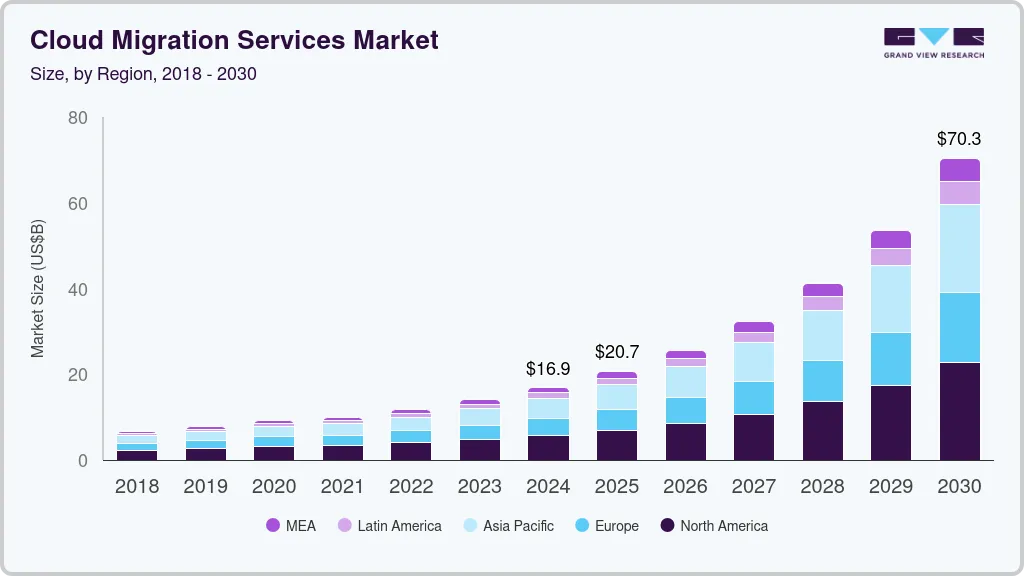
If we look at the stats, then according to a report by Grand View Research, the global cloud migration services market size was estimated at USD 16.90 billion in 2024 and is projected to reach USD 70.34 billion by 2030, growing at a CAGR of 27.8% from 2025 to 2030.
After understanding the result-driven benefits of cloud app development, you may be wondering how to implement it, what features to include, and the step-by-step process to get started. So, you have come to the right place, as in this blog, we are going to discuss these notable points about cloud-based applications.
Let’s explore the full potential of cloud apps!
What is a Cloud Application?
In simple terms, cloud applications are those applications that work online and store data on cloud servers, not on your device. For example, Gmail, Google Drive, Netflix, and Zoom. In addition to that, these applications can be accessed through the internet using a web browser or mobile app, without requiring local installation in many cases, particularly for web-based access.
These applications are different from traditional applications, as these cloud based applications do not depend on a single machine or local server. However, these cloud applications use remote data centers to store data, process requests, and deliver services.
Additionally, in this data-oriented world, cloud app development for business provides multiple advantages like flexibility, scalability, and cost-efficiency. Moreover, cloud based applications allow organizations to scale resources on demand and manage large volumes of data efficiently. As a result, this whole process helps businesses in reducing infrastructure costs.
Different Types of Cloud Deployment Models
There are 4 main types of cloud deployment models based on how cloud infrastructure is owned, managed, and accessed by businesses. Let’s look into it one by one:

1. Public Cloud
Public cloud is operated by third-party providers like AWS, Microsoft Azure, or Google Cloud, where computing resources are shared with multiple users. Public cloud models are highly scalable, cost-efficient, and ideal for businesses that want fast deployment.
2. Private Cloud
A private cloud is dedicated to a single organization and can be hosted on-premises or by a cloud provider. This type of cloud model offers higher control, enhanced security, and better compliance.
3. Hybrid Cloud
Hybrid cloud models mean combining public and private cloud environments to allow data and application portability. These hybrid cloud solutions let businesses balance security, performance, and scalability.
4. Multi-Cloud
Multi-cloud involves using services from multiple public cloud providers to avoid vendor lock-in and improve system reliability. This multi-cloud model will help businesses in choosing the most suitable features from each platform.
How Does a Cloud App Work?
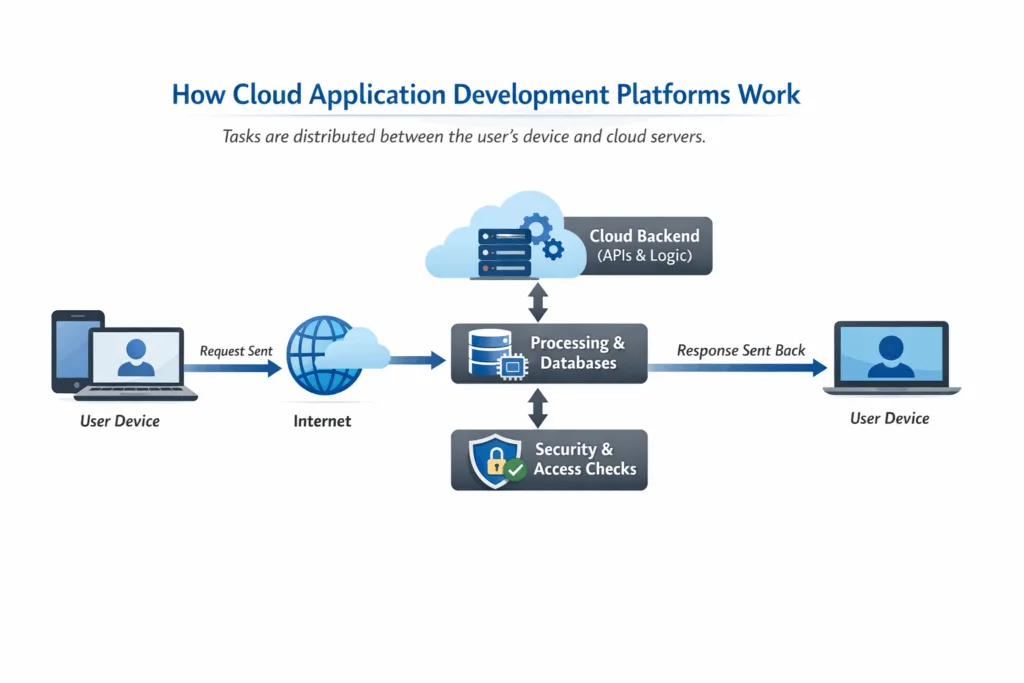
Cloud applications operate by distributing tasks between the user’s device and cloud servers. When the user interacts with the application, the request is sent over the internet to cloud servers, and data is stored or retrieved.
Afterwards, the cloud infrastructure handles computing, security, and scalability before sending the response back to the user in real time. Additionally, it also ensures high performance, reliability, and a seamless user experience across devices.
What are the Benefits of Using Cloud-based Applications?
Before you get to know the cloud based application development steps, let’s look into the result-oriented benefits of it. Cloud app development offers multiple benefits for businesses of all sizes. From reducing operational costs to improving performance, cloud based apps manage resources efficiently and scale seamlessly.
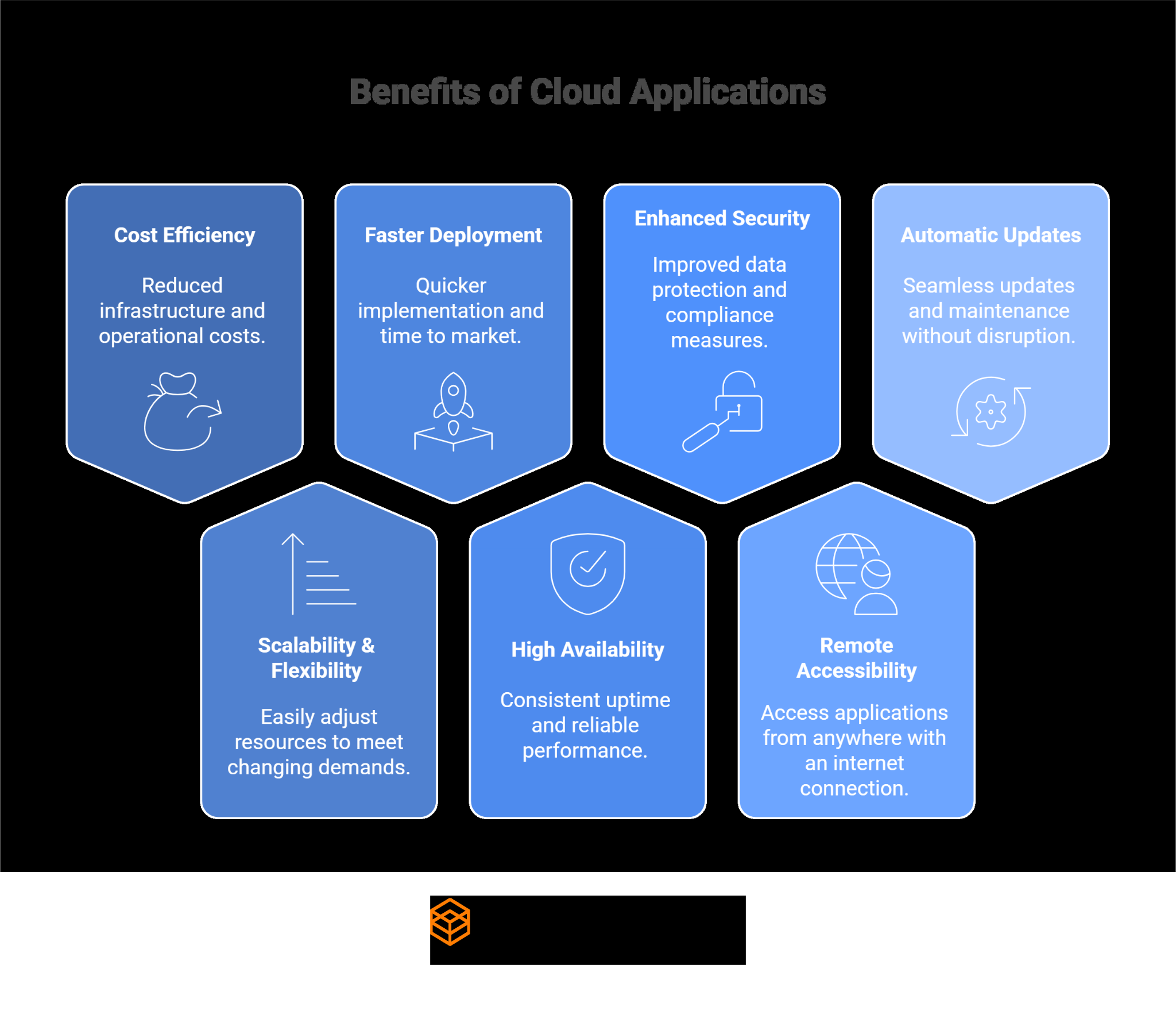
1. Cost Efficiency
The first benefit of Cloud application development for businesses is that it offers cost efficiency by eliminating the need for heavy upfront investment in physical infrastructure, such as servers, storage, and networking hardware. Moreover, with cloud applications, you don’t have to purchase or maintain on-premise systems, instead, businesses pay only for the resources they actually use.
2. Scalability & Flexibility
Another benefit of cloud based applications is that they provide scalability and flexibility simultaneously. Resources like computing power, storage, and bandwidth can be adjusted on a real-time basis; as a result, this whole process can boost flexibility. Moreover, cloud based applications also ensure that businesses can provide consistent performance when traffic spikes.
3. Faster Deployment & Time to Market
Cloud-based apps provide ready-to-use environments, development tools, and automation features that ultimately speed up the cloud application development process and deployment. With this faster deployment and time to market, development and engineering teams can quickly build, test, and launch applications without waiting for hardware setup. Moreover, this faster time to market allows businesses to respond quickly to customer needs.
4. High Availability & Reliability
The cloud application development process is designed in a way that it has built-in redundancy, load balancing, and disaster recovery mechanisms. In addition to that, these applications are hosted across multiple servers and data centers. This whole process helps businesses in ensuring continuous availability even if one component fails. This level of reliability makes it easy to deliver uninterrupted services to users.
5. Enhanced Security & Compliance
Cloud-based applications provide high-end security with the help of advanced security frameworks implemented by leading cloud providers. These frameworks offer multiple layers of protection to safeguard sensitive data and applications. Additionally, it also protects important business data at rest and in transit, identity and access management (IAM), and continuous security monitoring.
6. Remote Accessibility & Collaboration
Cloud app development platforms can be accessed from anywhere with an internet connection; this is one of the best capabilities, which makes it an ideal choice among businesses. Additionally, cloud-based applications also ease team collaboration in real time and help in sharing data seamlessly across multiple devices. Ultimately, this improves productivity, communication, and overall workflow efficiency of any business.
7. Automatic Updates & Maintenance
In cloud-based app development, you don’t have to regularly update or maintain the app; rather, cloud service providers manage the infrastructure, software updates, and security patches automatically. As a result, this automation helps in reducing the burden on internal IT teams and ensures applications remain updated with the latest features and security improvements.
You can also achieve these benefits for your business with the help of a mobile app development company that can build you a scalable, secure, and high-performance cloud-based application.
Key Features of Cloud-Based Applications
Before you initiate the process of cloud native app development, knowing what features can enhance your business productivity, efficiency, and security is important. Not only this, but including key features in your cloud application development will help you stay ahead of competitors.

1. On-Demand Scalability
The first feature that you must have in your cloud based business application is on-demand scalability. This feature will ensure that the application automatically adjusts resources based on user demand, traffic spikes, or business growth. With on-demand scalability, your app remains fast, responsive, and reliable even during peak usage.
2. High Availability Architecture
Maintaining a high availability architecture is crucial, and these cloud-based apps can provide you with a high availability architecture. These applications are hosted across multiple servers and data centers, often with built-in redundancy, failover mechanisms, and load balancing. Additionally, users can access the service anytime, anywhere, without interruptions.
3. Anywhere, Anytime Accessibility
Cloud-based applications provide anywhere, anytime accessibility, which simply means users can access the application from any device with an internet connection. This feature also supports flexible work environments, remote teams, and global collaboration, which ultimately helps boost team productivity in real time.
4. Built-In Data Security
Security is an important factor in any application. Hence, you must ensure that you build a well-secured cloud application for your business. You should have a HIPAA-compliant app for a healthcare business to protect sensitive patient data, maintain privacy, and meet regulatory requirements
5. Automatic Updates & Maintenance
While building a cloud based application with the help of an AI app development company, you should integrate features that can automatically update and maintain your app. To do this, developers should use a cloud-native architecture with managed services. And they can also implement CI/CD pipelines to automate testing, deployment, and updates without downtime.
6. Pay-As-You-Go Cost Model
Another key feature that you should include in your cloud application development is a pay-as-you-go cost model. This model allows businesses to pay only for the cloud resources they actually use, such as computing power, storage, and bandwidth. Additionally, this will also help you in eliminating large upfront infrastructure costs, optimizing budget planning, and making cloud applications highly cost-efficient.
7. Seamless API Integrations
Cloud applications should be designed in a way that they can easily connect with third-party services, internal systems, and other cloud platforms through well-defined APIs. Integrating APIs will allow smooth data exchange, workflow automation, and feature expansion without major code changes.
Step-by-Step Process of Cloud Application Development
After knowing the key feature, you should know the strategic step-by-step process of cloud application development. Each step focuses on supporting future growth and delivers a seamless user experience.

1. Requirement Analysis
The cloud application development process begins with analyzing the requirements and understanding business goals, target users, functional requirements, and security needs.
2. Cloud Architecture Design
At this stage, the cloud architecture is designed to define components such as microservices, databases, storage, networking, and deployment models (public, private, or hybrid cloud).
3. Tech Stack Selection
Selecting the correct and reliable technology stack is important, as the performance of the application, scalability, and long-term maintainability depend on a future-ready tech stack. Here, you can hire cloud engineers to choose the result-driven programming languages, frameworks, databases, and cloud services.
4. Cloud-Native Development
Building cloud-native applications using cloud-native principles like microservices, containers, and managed services helps in ensuring flexibility, scalability, and faster updates.
5. API & Service Integration
If your cloud based application requires third-party integrations, then you must integrate APIs into internal systems and cloud tools. As a result, this will help you enable seamless data exchange and extended functionality.
6. Testing & Security
Performing comprehensive testing is important to ensure functionality, performance, and security of the cloud based application. Additionally, it includes vulnerability testing, compliance checks, and performance validation.
7. Deployment & Scaling
This is the last step, where your cloud-based application is deployed using automated CI/CD pipelines. After going live, the auto-scaling mechanism ensures the app adapts to user demand without having any performance issues.
8. Monitoring & Optimization
After making the cloud-based application live, businesses should do continuous monitoring of the app to ensure it is functioning as expected. Ongoing monitoring helps identify performance issues, security risks, and areas that require optimization.
Cost of Cloud Application Development
According to current market standards, the estimated cost of cloud application development in 2026 typically ranges from $10,000 to $200,000+. Other than that, the cost depends on multiple factors, where complexity plays a crucial role. For example, a simple MVP may cost you around $10,000 to $15,000, whereas a medium-complexity application costs you somewhere between $50,000 to $150,000.
| App Type/Complexity | Description | Estimated Development Cost (USD) |
| Simple Cloud App (MVP) | Basic functionality, minimal integrations, and a few user roles | $10,000-$15,000 |
| Simple Cloud Web App | Basic web UI & logic | $30,000 to $200,000+ |
| Medium Complexity Cloud App | Moderate features, some API integrations, basic business logic | $50,000 to $150,000 |
| Enterprise-Grade Cloud App | Advanced features, high scalability, security & compliance | $150,000-$400,000+ |
| High-Complexity Cloud Platform | Custom architecture, real-time data, multi-role access | $150,000-$450,000+ |
Factors Affecting the Cost of Cloud Application Development
As said, the cost of cloud based applications depends on multiple factors, which ultimately change the cost. In this section, let’s look at some major factors that affect the cost of cloud application development.
- Application Complexity
The overall complexity of the application plays a major role in app development cost. If you want an app that is complex and feature-rich, it may cost you more than a basic cloud based application.
- Cloud Platform & Services Used
Major cloud platforms like Amazon Web Services (AWS), Microsoft Azure, and Google Cloud Platform (GCP) affect the price. This is because each platform offers different pricing models, services, and resource usage patterns.
- Architecture & Deployment Model
The application architecture plays a crucial role in cloud app development cost as it defines how the application is designed, deployed, and scaled. Additionally, deployment models such as public, private, hybrid, or multi-cloud also impact the app cost and resource usage.
- Location of Development Team
The cost of cloud based applications varies depending on whether you hire an in-house team, outsource development, or hire cloud engineers from different regions.
- Technology Stack Selection
The next factor that can deeply affect the cost of cloud based application is choosing the right and reliable tech stack for cloud application development. It includes the selection of programming languages, frameworks, databases, and cloud tools.
- Security & Compliance Requirements
Implementing strong security compliances such as GDPR, HIPAA, or SOC 2 requires additional development, testing, and auditing efforts; as a result, it increases the cost. Moreover, you can hire an AI developer to automate the compliance process, review, and risk assessment, which helps reduce manual effort.
- Third-Party Integrations & APIs
API development and third-party integration play a crucial role in boosting the cloud based app cost, as it includes services such as payment gateways, analytics tools, CRM systems, etc.
- Scalability & Performance Needs
Cloud-based applications that need to perform for high traffic, real-time processing, or global users require advanced scaling that ultimately increases the cost of development.
Popular Cloud Platforms and Tools
| Category | Tools/Platforms | Key Purpose |
| Leading Cloud Platforms | AWS, Microsoft Azure, Google Cloud Platform (GCP) | Provide scalable infrastructure, compute, storage, networking, AI, and managed cloud services |
| Cloud App Development Frameworks & SDKs | Spring Boot, Node.js, .NET, Django, Flask, React, Angular, AWS SDK, Azure SDK, Google Cloud SDK | Enable faster cloud-native application development with reusable components and cloud integrations |
| CI/CD & DevOps Tools | Jenkins, GitHub Actions, GitLab CI/CD, AWS CodePipeline, Azure DevOps, Terraform | Automate code integration, testing, deployment, and infrastructure management |
| Monitoring, Logging & Observability Platforms | Amazon CloudWatch, Azure Monitor, Google Cloud Operations, Prometheus, Grafana, Datadog | Track application performance, monitor logs, detect issues, and ensure system reliability. |
Cloud Migration and Legacy App Modernization
Businesses that still rely on legacy applications should move their app to the cloud with a cloud migration service, or they can also take advantage of legacy app modernization services. Legacy app modernization includes upgrading the app to work better in today’s cloud-first world, whereas cloud migration includes moving the app to the cloud.
1. Rehost, Refactor, Rearchitect Strategies
Based on business needs and goals, a business can choose different approaches like rehosting, refactoring, or rearchitecting. With the rehosting approach, businesses can move the existing application to the cloud with minimal or no code changes.
If you choose refactoring, then you can optimize certain components of the app to take advantage of cloud capabilities. Lastly, if the company chooses rearchitecting the application, then it includes redesigning the app to adopt a cloud-native architecture.
2. Hybrid Cloud and Multi-Cloud Adoption
To balance flexibility, cost, and security, organizations can adopt hybrid or multi-cloud strategies. If businesses choose a hybrid cloud strategy, they can use both on-premises systems (local servers) and cloud services together.
On the other hand, if businesses opt for multi-cloud services, then they can use more than one cloud provider, such as AWS, Azure, or Google Cloud. As a result, these approaches help in reducing vendor lock-in, improving resilience, and meeting compliance requirements.
3. Integration with Legacy Systems
During cloud migration or modernization, it is important to keep legacy systems connected with new cloud applications; this can be done through APIs, middleware, and integration tools. In addition to that, this integration will help you achieve smooth communication between older systems and modern cloud platforms.
Moreover, it will also help you use critical legacy functionality while gradually transitioning to modern cloud technologies. This leads to reducing risk and avoiding operational disruption for all businesses.
4. Common Pitfalls and Best Practices
While shifting the legacy system to a cloud platform, developers may experience some common challenges like unclear migration goals, underestimating costs, security gaps, and compatibility issues.
Real-World Use Cases of Cloud Application Development
Cloud application development is widely adopted across industries, as it provides multiple benefits like scalability, flexibility, cost savings, better collaboration, faster deployment, and much more. Let’s better understand this through real-world use cases:
1. Enterprise Digital Transformation
Cloud application development helps organizations in transforming digitally by moving critical business applications to the cloud platforms. This helps them improve operational efficiency, adopt digital workflows, achieve better scalability, enhance security, and speed up deployment.
2. SaaS Product Development
Cloud platforms are ideal for building SaaS-based products that require multi-tenant architecture, high availability, and automatic updates. Not only this, but cloud based SaaS applications also allow businesses to scale globally and manage users efficiently.
3. AI, ML, and Analytics Platforms
With the help of cloud environments, businesses can use cloud-based AI platforms to analyze large datasets, generate insights, and build intelligent applications. As it provides the computing power and data processing capabilities needed for AI, ML, and advanced analytics applications.
4. IoT and Edge Computing Solutions
Cloud applications support IoT and edge computing solutions by enabling real-time data collection, processing, and analytics. Along with that, the cloud platform also manages and processes data from connected devices to ensure seamless connectivity, low latency, and secure communication.
Future Trends in Cloud Application Development
As we have learned multiple notable things about cloud application development, it is necessary to know whether this approach is long-term viable or not. So, let’s look at the future trends of cloud app development that may shape how businesses build, scale, and secure cloud-based applications in the coming years.
- AI‑Driven Cloud Platforms and Services: In the future, we can expect the cloud platforms to be AI-driven. Where AI in cloud applications may automatically manage infrastructure, optimize performance, and reduce operational costs.
- AI‑Native Cloud Development and Application Design: Cloud applications may increasingly be designed as AI-native from the start, rather than integrating AI and AI-based technologies later.
- Hybrid and Multi‑Cloud Strategies as Standard: Hybrid and multi-cloud setups are expected to become the standard approach. This is because businesses will need greater flexibility, better cost control, and reduced dependency on a single cloud provider.
- Edge‑to‑Cloud Integration: In the future, tighter integration between edge devices and cloud platforms may enable faster data processing. As a result, businesses can reduce latency, improve real-time decision-making, and handle data closer to its source.
- Serverless and Event‑Driven Cloud Architectures: Serverless and event-driven architectures are likely to see wider adoption because of their simplified backend management approach.
- Zero‑Trust and AI‑Enhanced Cloud Security: Cloud security is expected to evolve toward zero-trust models, which may have advanced AI-driven features to detect threats at an early stage.
Choosing the Right Cloud Application Development Partner
To achieve the goal-based results, businesses must choose an experienced cloud application development partner. At ScalaCode, we specialize in delivering scalable, secure, and high-performance cloud applications tailored to your business goals.
We have a robust team of 150+ developers who follow cloud-native best practices, modern architectures, and industry-compliant security standards to ensure long-term reliability and growth. With ScalaCode, you can hire mobile app developers and cloud experts who have hands-on experience across AWS, Azure, and Google Cloud platforms.
- Proven expertise in cloud-native application development
- Strong focus on security, compliance, and best cloud practices
- End-to-end services from development to migration
- Transparent communication, agile delivery, and ongoing support
ScalaCode Cloud Application Success Story: Web-Based Fitness & Sports App (GymFit)
Project: GymFit: Web-Based Fitness & Sports App
Cloud Platform: AWS
ScalaCode built GymFit on AWS cloud infrastructure to support rapid user growth and high traffic fluctuations. By leveraging AWS auto-scaling and managed services, the platform dynamically adjusts resources during peak usage, ensuring smooth performance and high availability.
Result: Provided improved scalability, faster deployments, and a cost-efficient cloud setup.
Conclusion
At the end of this guide on “Cloud Application Development in 2026,” we conclude that cloud app development is transforming the way businesses build, deploy, and scale applications. Not only this, but it also enables organizations to reduce costs, improve flexibility, enhance collaboration, and adopt advanced technologies like AI, IoT, and analytics.
Moreover, businesses investing in cloud app development can achieve faster time-to-market, ensure high availability and security, and stay future-ready. Along with that, a cloud-based application approach can help you in tackling modern business challenges and outperforming the competition.
FAQs
1. What is Cloud-Native Software Development?
Cloud-native software development is a process of building applications specifically for cloud environments rather than adapting traditional software for the cloud. These applications are microservice-based, container-based, API-based, and managed cloud service-based to become highly scalable, flexible, and resilient. Cloud-native applications are simpler to upgrade, automatically scale, and perform effectively on distributed cloud systems.
2. How Much Does Cloud Application Development Cost in 2026?
The cost of cloud application development in 2026 typically ranges from $10,000 to $25,000 for a simple MVP, $30,000 to $120,000 for a medium-complexity application, and $150,000 to $400,000+ for enterprise-grade cloud solutions. The final cost depends on factors such as application complexity, cloud platform, security requirements, integrations, and scalability needs.
3. Which Cloud App Development Platforms Are Best?
The optimal cloud application development resources are Amazon Web Services (AWS), Microsoft Azure, and Google Cloud Platform (GCP). AWS has the most extensive service portfolio, Azure is compatible with Microsoft applications and enterprise software, and Google Cloud is the best in data analysis. You can choose the appropriate platform based on the needs of the business, budget, and technical requirements.
4. How Can AI Improve Cloud Application Development?
AI enhances the development of cloud applications through automated monitoring, scaling, and optimization of performance. It facilitates predictive analytics, intelligent allocation of resources, faster identification of issues, and enhanced security by anomaly identification. Cloud applications are more efficient and cost-effective, as AI helps them in improving the development process with the help of AI-assisted coding, testing automation, and smarter decision-making.