

Businesses today face a critical challenge: updating their already tumbledown software systems. There has been a growing urgency to make this change due to increasing calls for competitiveness in organizations and the customers’ changing demands.
For example, the current technology environment requires the use of cloud-based systems such that the software is usable from anywhere with limited restrictions on time or device used. This flexibility is especially important to various businesses. The rationale why cloud computing is seen as such an effective enabler of software modernization.
As per the report recently released it has been identified that had the cloud computing market been USD 0.68 Trillion in 2024; it may reach up to USD 1.44 Trillion by the year 2029. The market in this forecast period is expanding at an estimated CAGR of 16.40%.
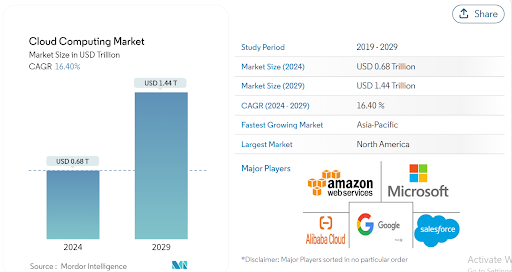
This accelerated growth is a result of the increasing use of cloud solutions, where more than 90% of businesses are embracing cloud technology. Specifically, 60% of them are using public clouds, and 45% are using private clouds.

Based on this, there is a need for businesses to integrate and upgrade suboptimal legacy systems with cutting-edge technologies, enabling them to fully unlock the potential of highly refined innovations.
But, most of you might have a question: How do I go about it in this process of modernization? It is important to make a distinction between strategies and approaches used in the organizations. Be sure to scroll down and see what things to do for this blog.
However, first, eliminate some of the lists of basic things- first and foremost.
What exactly are legacy systems?
It is possible to refer to a legacy system as an older computer system or application that is still being utilized within an organization despite the availability of more latest technologies. These are those systems that might have been implemented several years ago and are presently deeply entrenched in everyday business operations.
At the time of the implementation, they were probably at the edge of cutting but are now outdated. Although, operating and maintaining legacy systems can be expensive. They may also lack flexibility and scalability in terms of modern business operations.
Therefore, over time, the hardware and software that support these systems may become obsolete. This ultimately makes replacement parts or technical support difficult to obtain.
Moreover, they are often not integrated well with newer technologies, and this can be limiting as an organization tries to innovate and grow.
Reasons Why Your Legacy System Needs Migration to Follow
The landscape has really changed a great deal, and businesses depend on more advanced solutions to their needs. Modern systems are endowed with many features to cater for efficiency.
They perform better and have been designed in such a way that they are friendly to the user and can adapt to the variance within changing business needs.
It is for this reason that many organizations would like to migrate from using their old legacy systems to new and more advanced ones. Let’s see more reasons why the legacy system needs migration:
1. High Maintenance Costs
Legacy systems can be one of the costliest things to maintain in any corporation. They need special knowledge to keep them going, and operate effectively, which might be difficult to find after a period of time. This is because there are a few experts who know ancient programming languages like-
- Fortran
- Lisp
- Pascal
- COBOL.
Sometimes, the maintenance cost of the legacy system can also exceed the adoption of new technology.
2. Security Vulnerabilities
Security appears to be one of the big-talk concepts in the tech world as of now, right? Legacy systems have huge threats regarding cyber-attacks. This is because they were developed before considering the security standards of the modern world.
Without appropriate security and protection, these systems cannot protect themselves from cyber-attacks. As technology advances further, it becomes very easy to hack into such systems.
3. Incompatibility with Modern Technology
Trying to integrate the latest technology into the legacy system is like fitting a square peg in a round hole. In most cases, they will struggle to talk to new applications, so this greatly limits your capability for innovation and adaptation in response to the changes in the market.
This may potentially stifle growth and inhibit the full exploitation of newer technological advancements.
4. Poor Performance and Reliability
Do you want your business operations to be effective and reliable? Of course, you do! However, the legacy system is known for slow performance and crashing down.
For instance, BlackBerry’s downfall wasn’t just hardware. Legacy software issues like limited messaging and app store capabilities, along with a focus on enterprise use cases, hindered its growth. While they missed the smartphone revolution, BlackBerry pivoted successfully to cybersecurity, proving their resilience.
Such interruptions may result in lost business and damage to reputation.
5. Difficulty in Data Access and Reporting
In today’s data-driven environment, speed to information access and analysis is often the key to your business. Most legacy systems provide extremely limited data access and reporting capabilities. This can lock you into ineffective decision-making, leaving you far behind your competitors as they leverage their access to information against you.
6. Lack of Support and Updates
The older a particular software, the fewer the support and updates available. Vendors may withdraw support for older systems, thus leaving one in the cold if things go wrong. This may render the ability to patch bugs or keep up with changing compliance requirements rather tricky, thus giving rise to operational risks.
7. Regulatory Compliance Challenges
It is difficult to keep abreast of regulations, especially if your systems are outdated. Legacy systems may not meet today’s standards and regulations. That simply puts your business at risk legally speaking. A migration to new systems means you are meeting all the regulations and requirements that may avoid costly penalties.
8. Limited Scalability
Imagine your business is growing but your systems just can’t scale with that. That is one serious problem associated with legacy software. Many of them do not have the scaling capacity needed to accommodate growth and thus tend to throttle expansion initiatives and limit your overall prospects.
9. Missed Opportunities for Innovation
Is this not the beat of progress? Well, innovation surely has a huge roadblock when legacy systems are involved. You could either miss an opportunity by continuing to use outdated technologies or fail to meet customers’ new expectations.
10. Negative Impact on Customer Experience
Actually, the business is driven by your customers. Thus, it is very easy to see that most of the time, legacy systems affect customer experience through slow service, old interfaces, and limited functionality. Improved systems can bring in faster response times and improvements in overall service.
Strategies and Approaches for Legacy System Modernization
So, what can we do about it? Here are some strategies that organizations can consider:
- Rehosting: Sometimes referred to as “lift and shift,” it is about moving applications to new infrastructure without touching the code at the core. Being the most straightforward form of migration, this typically is the quickest way to make the move to a new environment. This goes well with organizations that want to relocate their systems with few changes.
- Replatforming: This form involves optimizations made at the application level but does not involve the core architecture of the application. It allows for the taking advantages of new platform features such as improved performance or cost savings without rewriting it fully. This is somewhat of a mid-ground approach for software migration that forms a tradeoff in speed and efficiency.
- Refactoring: Refactoring means the re-architecture of the application to fit modern environments better. In refactoring, which is a heavier software migration approach, code is changed to utilize native cloud features for better scalability and performance. It is more time-consuming and resource-intensive but provides long-term benefits since it will fully optimize the software in its new environment.
- Replacement: This is an option whereby the old system would be replaced with a completely new one that has been designed to cater to modern needs. It can occur in cases when the old system is already too outdated to update it. Replacement may be more expensive and consume more time at the very beginning, but it offers the greatest completeness of a solution; the new system fully meets the current and future business needs.
- Rebuild: Rebuilding entails rebuilding from scratch. You build a new system that satisfies exactly the same needs as the legacy one but uses modern technologies. It is like tearing down an old house and building a brand new house in its place.
Each of these kinds of Strategies for Legacy System Modernization bears certain advantages and difficulties. Which one is applied depends on a variety of factors: current state as related to the legacy system, business goals, and available resources. Organizations should carefully assess their needs and capabilities before having application modernization services.
Steps in Modernizing a Legacy System
Modernization of legacy systems is something not ‘nice to have,’ but an absolute must for organizations in order for them to remain competitive and secure. But how do companies update these systems without causing chaos?
Step 1. Assessing Your Current System
Basically, this is the need for you to assess your existing legacy system before modernization. It will indeed help you understand what can be directly migrated, what needs modification, and what needs to be replaced.
By deeply evaluating your system to prevent unnecessary disruption, you are able to give a very clear roadmap for smooth migration.
First of all, you should document all parts of your legacy system: hardware, software, data, and network configurations. Make a list of all applications and services dependent on this system. It will help you to understand the dependencies in your system and thus plan what should be migrated or modernized jointly and what can be dealt with separately.
So, a performance versus stability assessment of your present system should be started right away.
- Try to identify any bottlenecks or sets of recurrent issues that could be resolved using a modern solution.
- Concurrently consider how the current usage is, and whether its capacity meets your organizational needs.
This will give an indication of what needs to be improved with the new system.
Besides, the security of your legacy system also has to be very much evaluated. Search out any kind of vulnerability that may expose an organization to different kinds of cyber threats. Modernizing a system can offer improved security features.
Step 2. Setting Clear Objectives
After having assessed your legacy system, clear objectives for its modernization should be set. You cannot simply dive right into something if you do not know what you want to achieve, right? With well-specified objectives, this will ensure that the modernization will fall within your organization’s greater strategy. Plus, it will help measure success later on.
Also, the shortfalls of the system and what changes would provide improvement need to be informed and discussed with key stakeholders, IT staff, department heads, and end-users. This ensures that there is one voice for all, and the objectives are realistic and meaningful towards the benefit of the entire organization.
Prioritize the objectives. Which ones are most urgent? Is system performance the most critical issue for you, or do security concerns or user satisfaction need more attention? Perhaps it’s all three! In that case, you’d rank these objectives in order and then concentrate your efforts and resources.
Step 3: Choice of Technology
Now that you have your objectives set, it is time to choose the right technology to meet those goals. Since technology is rapidly improving, solutions should be selected to meet not only today’s needs but also must be future-proof.
First, do some research into what current technology trends are for your particular industry. Some popular trending choices right now to modernize a legacy system include cloud computing, artificial intelligence, and machine learning. But just because something is trendy doesn’t mean that it’s right for your organization.
So, evaluate how those technologies fit into your existing architecture. Transitioning to a cloud-based infrastructure, for example, provides flexibility and scalability but will undoubtedly alter how your IT department functions.
It is important to look at how much the new technologies cost: not only the initial investment but also ongoing maintenance and training costs.
Besides, check that the chosen technologies are compatible with your existing systems or can be accommodated with the least disruption. It is not just a question of upgrade; continuity and smoothness of operation during and after transition have to be ensured.
Therefore seek expert advice. Be it a technology consultant or a vendor, professional guidance can go a long way in making appropriate choices.
Step 4: Planning the Modernization Process
This phase gives an overview of how the transition will take place. Advanced planning may save you from pitfalls and make sure that this transition goes far smoother.
The first thing is to create a detailed timeline of migration. Divide the work into logical phases and define deadlines for each phase. The structured plan will allow avoiding procrastination and not making the project drag on for an indefinite time.
Next comes the delineation of roles and responsibilities. Who will be in charge of this migration process? Which are the teams that will handle different aspects of the migration? Clear accountability ensures efficiency in execution and reduces the chances of overlooking major steps.
Also, consider the potential complications and come up with contingency plans for when this or that may go awry. For example, how is one going to deal with free time? And what if the migration does not turn out as it was assumed? The presence of contingency plans may soften the impact of unforeseen events.
Besides, communication be effective throughout the process of migration. Update all stakeholders on all aspects: progress, modifications, and problems. This openness fosters good relations and may lead to quicker resolution of issues.
Step 5: Implement and Test
This is where the rubber hits the road, so to speak. Now it is time to put your plan into action! Begin migration of data and applications based on strategies you have decided on. However, go slow because careful execution is key, and haste can cause disruption.
Testing is part of the implementation. Proper testing serves to weed out all bugs and defects that might be inherent in the legacy system, which is expected to go live. Run multiple tests, such as functional, performance, and security tests. These are just a few that will ensure that your new system will meet the requirements and function properly.
It’s also worth doing some pilot testing. That means introducing the new system into operation with a small number of users first. Collect their feedback and make appropriate changes before you do a complete rollout. The risk of problems spreading to everyone is minimized.
Step 6: Monitor and Optimize
The journey of modernization does not quite end here. The journey is truly endless, and that is a fact. Continuous monitoring becomes highly crucial to ensure that your system delivers performance as expected and yields desired outcomes.
SetUp monitoring tools to track the performance of your system in finding bottlenecks and detecting potential security threats. Regular audits and reviews support maintaining optimal performance and security.
Ask for user feedback; you might learn things you have never contemplated. On that basis, do the adjustments and fine tune.
Remember, technology is constantly changing, so go back to your system from time to time and check whether it needs more updates or enhancements. It makes you proactive, enabling your system to become relevant to the missions of an organization and to current standards in the industry.
Post- Migration Best Practices
When you have finished with your software migration, it is vital that you go through business-like practices to get your new system running. Here are some key steps to take:
- Regular Monitoring: It is therefore important to monitor your new system as it starts to work. Employ utilization profile for purposes of self-performance evaluation in terms of response, error, and resource utilization. It acts as a check and balance system enabling you to correct any arising problems as they arise rather than waiting for them to get big.
- Routine Maintenance: It also suggests that system owners should do regular maintenance checkups to check whether all parts of their system are functioning optimally. This comprises installing new software.
- Continuous Training: It is thus important to make sure that all your staff is conversant with the new system. Schedule repeated training sessions for people to have a new update on other features or procedures.
- Data Backup: This should act as the final reminder; in any case, always back up your data frequently after migrating. When it comes to backing up your files, this can be made easier by the automated solutions in place to make sure that the most recent copy is always available.
- Documentation: Make certain to keep documentation files for the new system. These are user instruction manuals and guides, configuration procedures, and maintenance schedules. Documentation is incredibly useful for any kind of corporate problem, whether it’s troubleshooting or training a new hire.
- User Feedback: Gather customer information to find out what problems they experience and how the system may develop further. There is always a need to engage users to make changes that improve the systems that are in place for effective and efficient use.
- Security Audits: Provide recommendations for new policies on matters of security to prevent vulnerability from being taken advantage of. It must be understood that the system meets current security standards and requirements. A secure system protects your organization’s data and maintains customer trust.
- Performance Optimization: Continuously look for ways to optimize your system’s performance. This can involve tuning settings, upgrading hardware, or optimizing code. Performance optimization ensures that the system can handle increased workloads efficiently.
- Scalability Planning: Plan for future growth by ensuring that your system can scale as your business expands. Regularly review and update your scalability plans to accommodate new demands.
- Disaster Recovery Plan: Have a disaster recovery plan in place. This plan should outline steps to take in case of system failure, including how to restore data and resume operations quickly. A well-prepared disaster recovery plan minimizes downtime and disruption.
By following these post-migration best practices, you can ensure that your new system remains reliable, secure, and efficient, helping your organization thrive in the digital age.
How we can help as a legacy system migration and modernization company?
Migrating legacy systems may be one of organizations’ biggest challenges, it is our specialty to help ensure the process is quick and seamless. Our initial step is thus to evaluate the current system in order to establish the relevant areas that require upgrade. That migration plan is then done by our application modernization & migration team to suit the business needs of your company.
In order to minimize the restoration error and time, we employ advanced tools in the automation of the modernization process. Our professionals then assure the secure transfer of your data and guarantee the optimization of all components for enhanced performance.
Moreover, we continue to assist to make certain that your new system runs smoothly. It means the constant check-ups, eventual repairs, and upgrades necessary to make your system safe and effective.
By adopting our approach we intend to help you make your legacy system migration as smooth as possible and remain competitive in today’s world.
Wrap Up
Migrating legacy systems is essential for businesses looking to stay competitive in the modern digital landscape.
It is important to select the correct approach for legacy system migration and modernization. The first among these steps includes planning and evaluating the current situation of your system. After migration, the system will need constant supervision and updates to keep it up and running optimally and safely.
To sum up, modernizing your legacy systems is not an option, but a necessity that is more important for today’s business. In this context of competitiveness and accelerating digital transformation, your organization will get better performance, higher security, and higher scalability with the right approach.